How to Handle Missing Videos or Segments in Inspections
Last updated: March 3, 2026
If you notice missing video segments in your inspection or can't locate certain inspection videos, there are several steps you can take to resolve the issue.
When Videos Are Missing from Field Inspections
If you've just recorded a video but don't see it in Field Inspections, the issue may be related to software synchronization. Contact support to connect via TeamViewer for immediate assistance in recovering the video.
Finding Archived or Missing Inspections
To locate potentially missing inspections:
Check the project name and date range of the missing inspections
Verify the inspection type (CCTV, MACP, etc.)
Contact SewerAI support with these details:
Project name
Date range of missing inspections
Location/city of the inspections
Any specific segment references if available
Exporting Inspection Lists
You can export lists of your inspections to CSV format for easier tracking:
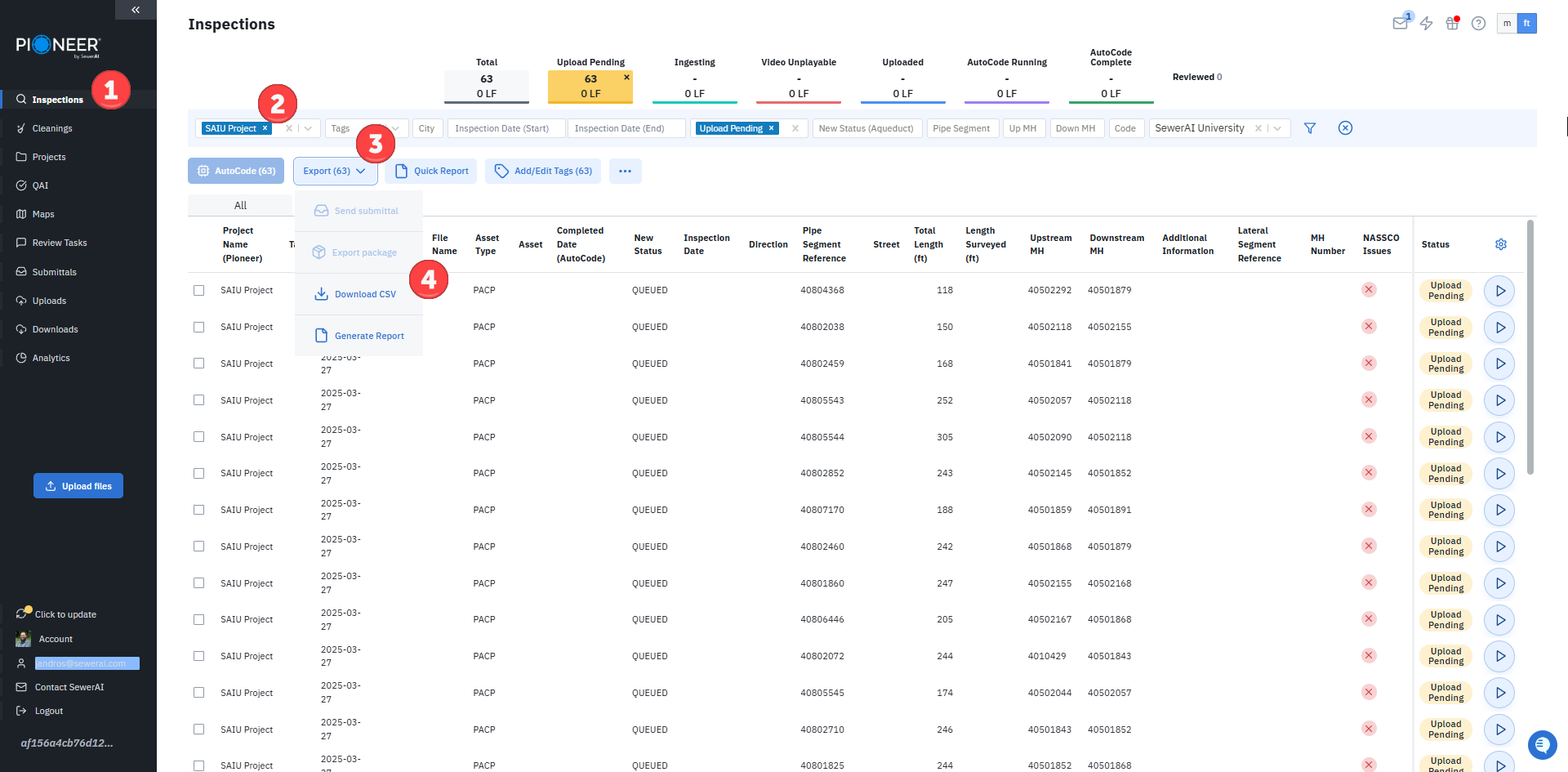
Navigate to the Inspections page in Pioneer
Filter for your desired project
Click the Export button
Click the "Download CSV" button to export the inspection list
Important: Users with view‑only access can only export reports, not video packages. If you need access to video files, the project owner must either:
Grant you full access permissions, or
Create a digital submittal that includes the videos you need
If the export fails or doesn’t provide a download option:
Check for NASSCO issues:
Apply the “with issues” filter to identify inspections with validation problems
Resolve any NASSCO issues before attempting to export again
For large exports (900+ videos), break the export into smaller chunks to prevent failures:
Export videos in batches (e.g., first two weeks, last two weeks of a month)
Use the zip file download option to ensure a stable export and complete download
Note: Downloaded packages are stored for 30 days. If you need to access a package older than 30 days, you'll need to regenerate it by creating a new export.
Note: Only SewerAI staff have access to archived files. If you need to recover archived content, please contact support with specific details about the inspections you need to retrieve.