How to Use the Calibration Board for Sewer3D Scans
Last updated: April 15, 2026
A calibration board is required to ensure accurate measurements in Sewer3D scans. This guide outlines how to obtain and properly use a calibration board for best results.
Obtaining a Calibration Board
There are two options for acquiring a calibration board:
1. Request a Durable Board
Contact your Account Manager to request a durable, long-term calibration board.
2. Print a Temporary Board
For short-term use:
Download the calibration board PDF
Print on 11" x 17" paper at 100% scale
Note: Printed boards are intended for temporary use and should be replaced with a durable version for ongoing inspections.
Using the Calibration Board
For accurate results, follow these guidelines:
Position Correctly
Place the board upright and perpendicular to the camera’s center line (field of view)Keep It Stable
Ensure the board is stationary—avoid movement or wind interferenceEnsure Full Visibility
All calibration targets must be clearly visible within the scanUnderstand Measurement Targets
The board includes targets at 18 cm, 24 cm, and 30 cm intervals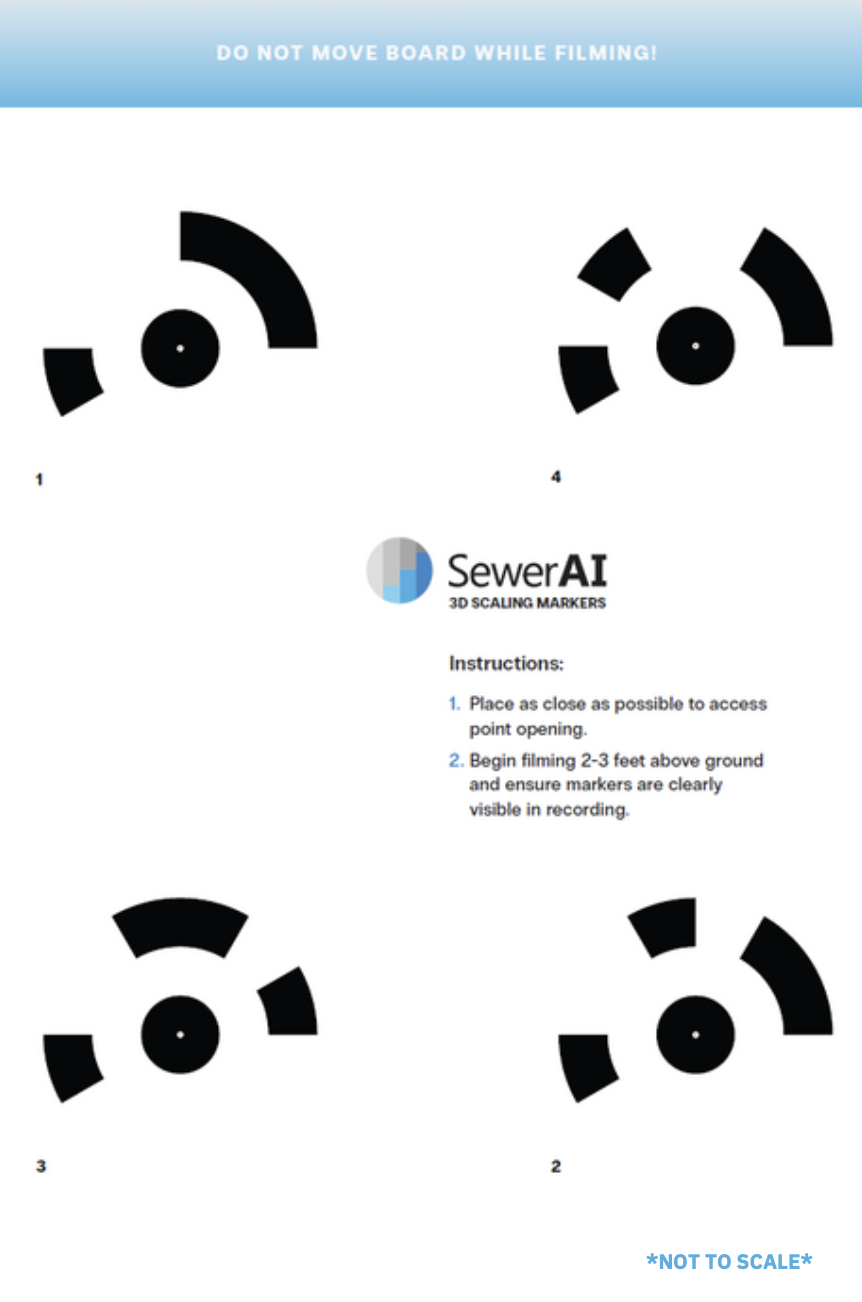
Best Practices
To improve accuracy and reliability:
Take at least one additional fixed measurement in the field as a backup
Confirm calibration targets are clearly visible and not obstructed (e.g., by smudges, water droplets, or 360° image seams)
Replace printed boards with durable versions for long-term use
Need Additional Guidance?
For more detailed Sewer3D scanning workflows and recommendations, reach out to your Account Manager for the full Best Practices guide.