Risk, Your Way: Bring Your Own Data into Risk & Rehab
Last updated: October 19, 2026
🌧 Your methodology. Your data. Scored in PIONEER.
Every utility possesses unique insights about its system that a standard risk model may overlook. For instance, it knows where the heaviest rain falls, which lines have already been repaired multiple times, and which pipes run beneath critical locations like hospitals, schools, or rail crossings. Until now, if this data did not align with our built-in factors, it was kept in a spreadsheet next to your risk scores rather than integrated into them.
That has changed. With Flexible Risk, you can upload your own data, convert it into a risk factor, and visualize it on the map, all within the Risk and Rehab platform without the need for a custom software project.
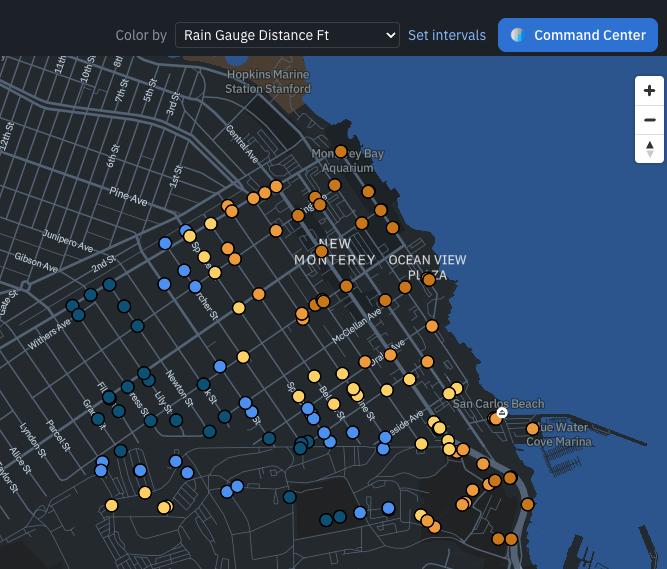
Flexible Risk: Map Rain Gauge Distance
💡 Why This Matters
Since launching Risk & Rehab, the most common question we’ve heard is some version of: “Can I use my own data?”
Engineering firms have proprietary scoring methods they’ve refined over years, often a different one for each utility client. Cities have criticality scores, work order history, smoke test results, and flow data they already trust. But when everyone had to fit one fixed approach, important decisions often happened outside of PIONEER.
Flexible Risk changes that. Our standard PIONEER risk model is still your starting point, and everything you’re used to is still included. Now you can build on that foundation, adding the factors that matter to your system and deciding how much each one counts.
🔧 What's New
Upload Your Own Data: You can upload a CSV file with any relevant data you want to assess for risk, such as rain gauge readings, repair history, critical facility locations, criticality scores, or other asset information. PIONEER will read the file, suggest interpretations for each column, and allow you to make corrections before the data is utilized.
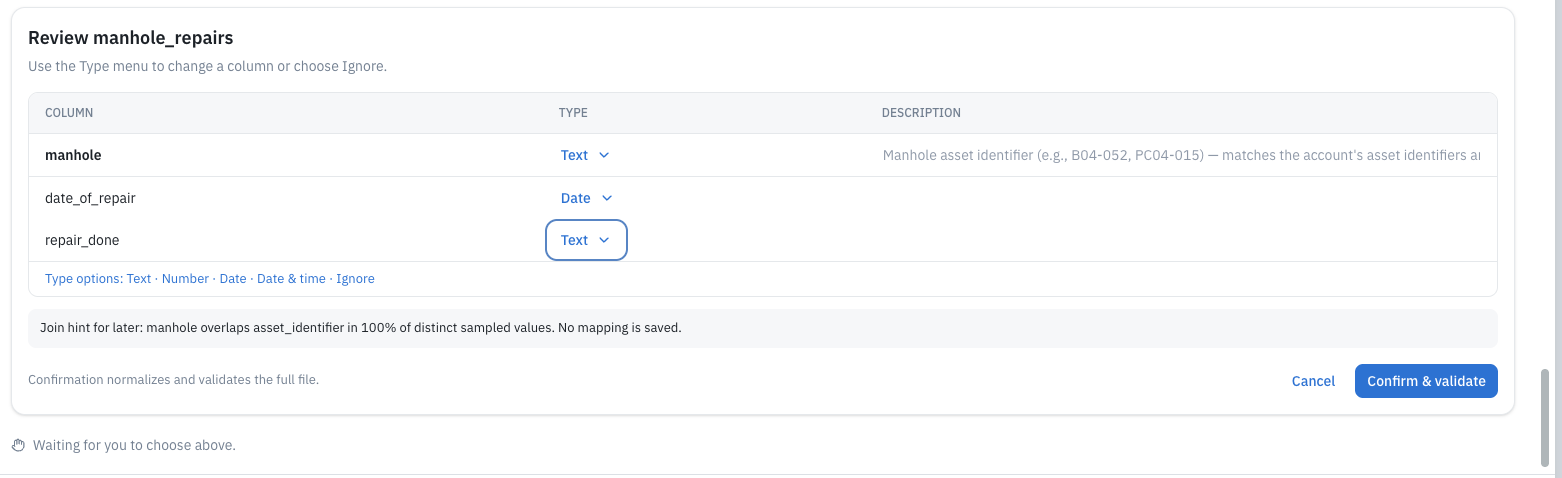
Match It to Your Assets: Inform PIONEER how your data correlates with your system, whether by referencing pipe segments, identifying upstream and downstream manholes, or using latitude and longitude within a specific distance. You will see how many assets match before you confirm, and any assets that do not match will not be assigned fabricated values.
Describe the Change in Simple Terms: Use the Risk Recipe builder to express your desired modifications, such as "Add rainfall to my likelihood of failure score." The builder will guide you through the process, ask clarifying questions, and suggest how to weigh the new factor.
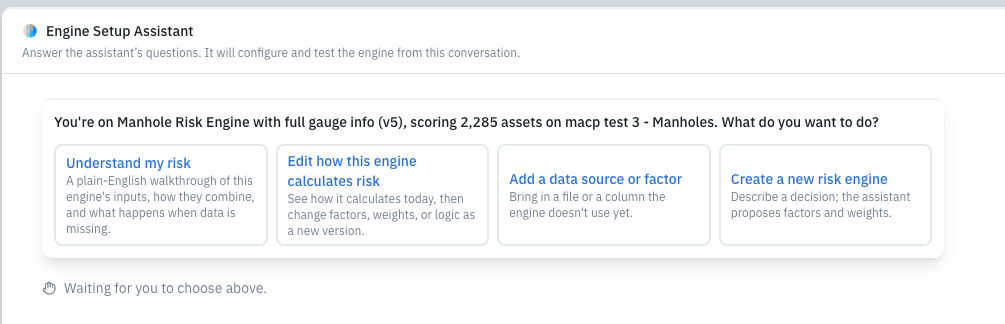
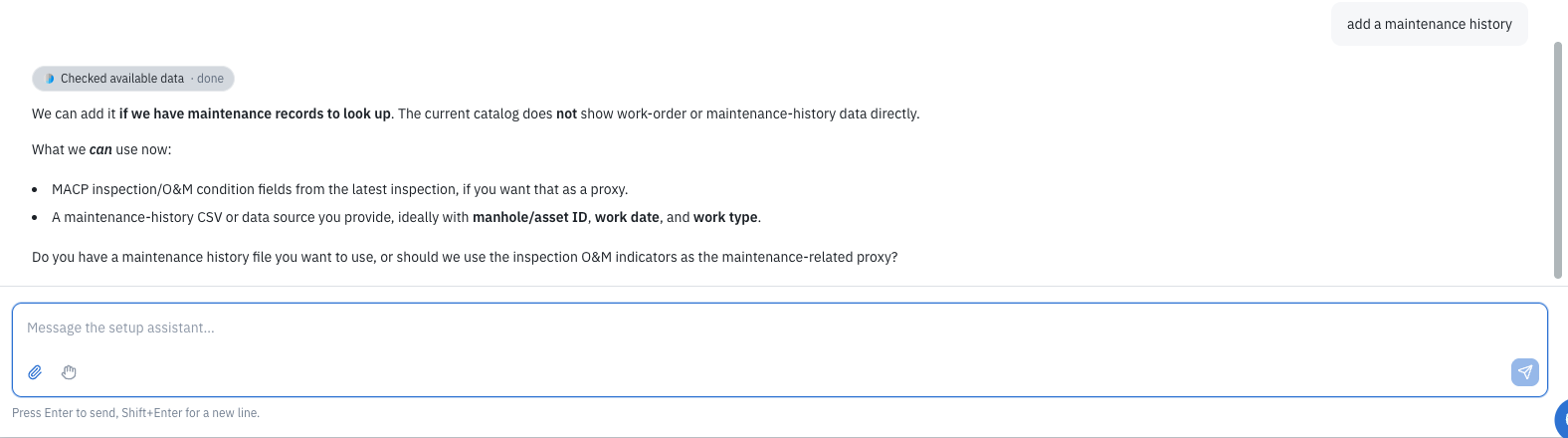
Choose Where It Counts: You have the option to add your factor to the Likelihood of Failure, Consequence of Failure, or keep it as reference information only. You decide the factor's weight.
Test Before You Publish: Run your draft on a sample of real assets to review the scores before going live. When you are satisfied, publish it as a named version and apply it to your mainline or manhole layer. If you want to make changes later, start a new draft; your published version will remain unchanged.
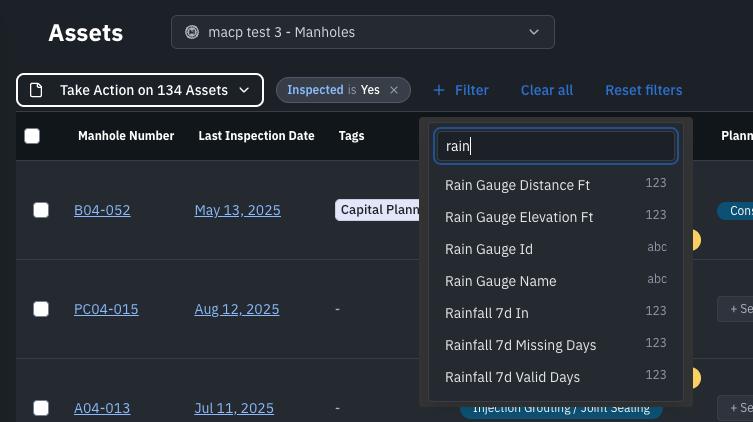
See It on the Risk Map and in the Risk Table: Each factor you add will become a new column that you can filter and sort, as well as a layer you can color on the map. You can set your own score bands and colors or use a neutral color scale for information that does not necessarily indicate "risk," such as pipe diameter or distance to a rain gauge.
Flexible Risk:Table Rain Filters
🌧 Example: Adding Rainfall to Risk
Here's what that looks like in practice:
A city uploads a CSV file with rain gauge locations, and PIONEER matches each gauge to nearby pipes. Next, they upload a second file with the daily rainfall totals for each gauge.
Using the Risk Recipe builder, they incorporate Rainfall Exposure into the Likelihood of Failure, weighting it at 10% of the overall score. They then test this on a selection of pipes, examine the nearest gauge and the maximum rainfall recorded over 24 hours for each pipe, and publish the results.
As a result, the map now displays which pipes are most exposed to rainfall, and the risk score reflects this exposure.
You can apply the same steps to other asset-linked data, such as repair history, critical buildings, and flow meters.
The same steps work for repair history, critical buildings, flow meters, or any other data tied to your assets.
👷 Designed for Engineering Firms and Established Utilities
If you're an engineering firm, Flexible Risk allows you to incorporate your own methodology into PIONEER and customize it for each client without waiting for us to implement it. For utilities with an approved risk framework, you can replicate it in PIONEER, ensuring that your scores, maps, and inspection data are all stored in one convenient location.
📌 What to Keep in Mind
Your current risk scores will remain unchanged. The standard PIONEER risk model serves as the foundation, with additional custom factors built on top.
We are migrating accounts in stages. Over the coming weeks, we will transition existing Risk & Rehab accounts to the new experience. If you do not make any customizations, the interface will look and function much like it does now.
CSV is the only supported upload format at this time. If your data is in a different format, please reach out, and we will help you convert it.
Published versions cannot be edited. Any edits will create a new draft, ensuring that you always know which version generated a specific score.
❓ FAQ
What types of data can I add?
You can add any data related to a pipe or manhole, including rainfall, repair or work order history, critical facilities, criticality scores, smoke test or acoustic results, flow monitoring data, and more. If you're unsure whether your data is suitable, feel free to send it to us for guidance.
Can I use data that changes over time, like daily rainfall?
Yes, you can upload time-series data, such as daily gauge readings, and use it in your calculations.
Do I need to know GIS or write formulas?
No, you describe what you want in plain language, and the builder will handle the setup. You will review and approve each step along the way.
Will this change my existing risk scores?
Your existing risk model remains unchanged until you decide to publish a new version. The risk scores will only change if you modify the recipe.
Can I add a factor without using it in the score?
Yes, you can include data for reference, which can be displayed on the map. For example, you might want to show how far each manhole is from a rain gauge.
How do I get access?
We are rolling out Flexible Risk to Risk & Rehab accounts in stages. To get started or discuss the data you wish to use, please get in touch with your Account Manager or Customer Enablement representative.
Learn more about Risk & Rehab →
Questions we didn't cover here? Reach out to your Customer Enablement contact or submit a ticket, and we're happy to help.