What Do the Risk & Rehab "Recommended Actions Mean?"
Last updated: November 13, 2026
Risk & Rehab suggests possible inspection, cleaning, rehabilitation and replacement actions. Review each recommendation with the asset's inspection history, GIS information and supporting explanation.
Recommendations are provisional planning guidance. They are not a substitute for the professional judgment of a licensed engineer, approval of a repair method or authorization to perform work.
Check Which Recommendation Engine You Are Viewing
For pipe layers, the selected Risk Recipe can use AI Recommendations or a Decision Tree. Their action names and explanations differ. The classic Risk Recipe drawer contains the Rehab Recommendation Engine choice. Select the intended layer and recipe before comparing results.
Manhole recommendations use a separate AI engine and manhole-specific actions. Do not apply the pipe glossary below to a manhole. See Risk & Rehab for Manholes.
Read an Asset's Recommendation
Open Risk & Rehab > Assets and find the asset in the relevant layer.
For AI results, select a recommendation in the table or the Chat button to open the AI Recommendation panel. Review its Assessment, Key Insights, Recommended Actions and action explanations.
For a decision-tree result, select its action pill to open How We Arrived At This Recommendation. Review the conditions on the decision path. Use View Full Decision Tree for the broader tree.
Check that the supporting inspection and asset data belong to the intended asset and are sufficiently current for your decision. Ask Support about missing results, mismatched data or an explanation that appears inconsistent.
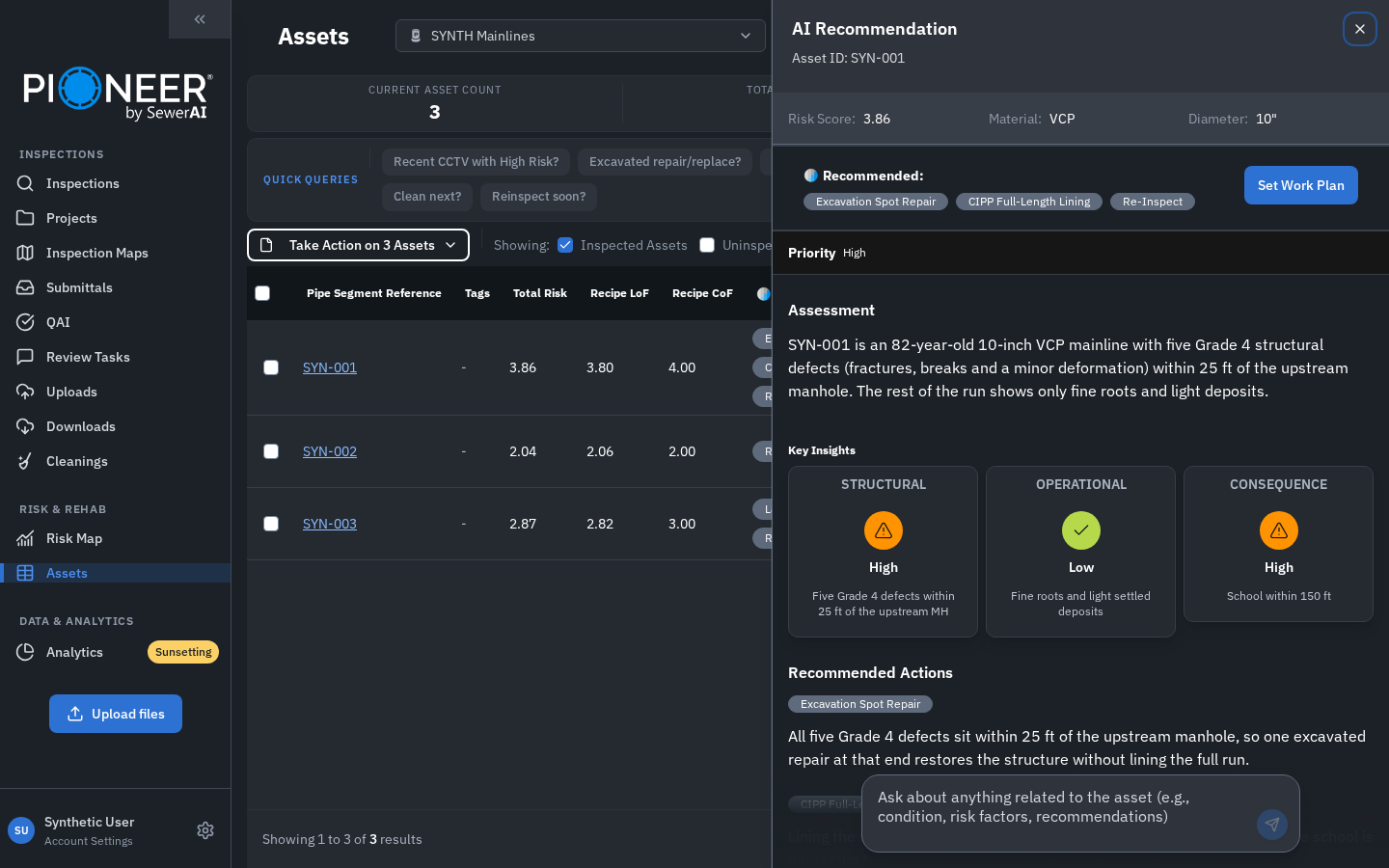
AI Recommendation panel with a synthetic example assessment and action explanations.
Decision-Tree Action Terms for Pipes
This glossary explains the existing pipe decision-tree guidance. It is not a complete list for every AI engine or custom tree. AI results include their own explanations and may suggest several actions.
The current label Point Repair / Lining (CIPP) corresponds to the older Point Repair / Line wording. Likewise, Specialty Prep / Line may appear as Specialty Prep / Lining (CIPP). The definitions describe planning considerations; the responsible engineer determines the appropriate treatment.
Replace | Asset contains serious and repeated defects, may have been previously lined, and likely merits replacement |
Consult an Engineer | OBI (possible cross-bore), Sags, Large Diameter pipes (36"+) |
External Point Repair | Open-cut, excavation, removal of a smaller section of existing pipe segment, and replacement with equivalent section of new pipe |
Specialty Prep / Lining (CIPP) | Prior to Lining, other actions may need to occur, such as to address infiltration |
Point Repair / Lining (CIPP) | Flags a significant defect for evaluation and treatment before lining. The responsible engineer determines the preparation or repair needed, including whether excavation is appropriate. |
Milling / Cutting | Milling recommended to deal with Intruding Taps, thick Roots (Ball or Tap), or Encrustation Deposits. Important prior to Lining |
Lining (CIPP) | Cured in Place Pipe Lining |
Trenchless Point Repair | Sectional CIPP, "patch" or other similar action |
I&I Repair / Study | Mitigate and investigate groundwater ingress/infiltration into pipe; often implies Grouting |
Clean with Caution | Pipe contains structural defects that high pressure jetting could exacerbate |
Heavy Cleaning | Hydraulic cleaning (aka Jetting) to remove roots, deposits, etc. |
Clean / Reinspect | O&M defects impacted ability to obtain sufficient assessment |
Clean & FOG Study | Grease deposits require cleaning and source should be investigated |
Monitor | Asset has a condition that could worsen but does not demand immediate attention |
Inspect Soon (9-18 months) | Lack of recent inspection data with cause for consideration |
Inspect as Scheduled | Default recommendation. Televise this asset according to a rotating schedule. |
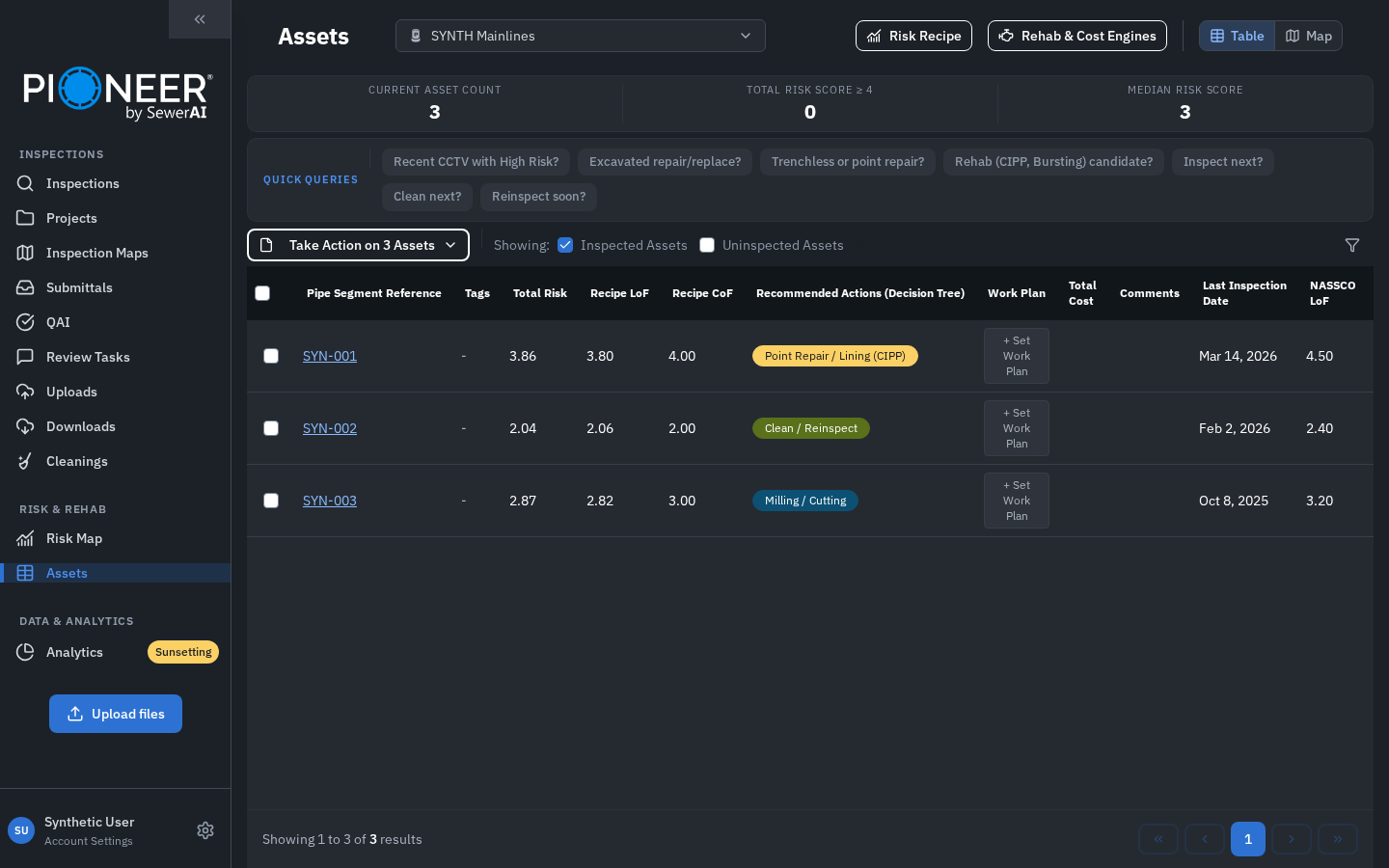
Illustrative decision-tree action pills with synthetic asset data.
Risk Scores, Costs and Work Plans Are Separate
The risk score helps prioritize assets. A recommendation proposes an action. An estimated cost is an estimate, not a quote. A Work Plan records the user's chosen plan; viewing a recommendation does not create one or perform work.
Setting or deleting a Work Plan requires Editor or Admin access for the asset. Some users see Interventions instead of Work Plan. The Take Action on Assets menu for reports, tags and downloads is separate from applying a Work Plan.
For scoring, see How We Calculate Risk. Flexible Risk is a limited preview with different setup controls; see Risk, Your Way and contact your account team about availability.
Still Need Help?
Use the chat widget in PIONEER to contact Support. If you cannot access it, email help@sewerai.com.